Direct traffic sounds straightforward — visitors who typed your URL directly into the browser. In reality, it’s analytics’ biggest catch-all bucket. When your tracking tool can’t figure out where someone came from, it labels the visit “direct.” That means your direct traffic number is part genuine fans, part mystery, and part attribution failure.
In my experience, direct traffic is rarely what it claims to be. I’ve audited dozens of analytics setups where 40-60% of traffic was labeled “direct” — and most of it wasn’t people typing URLs. It was broken tracking, dark social, mobile app referrals, and HTTPS-to-HTTP transitions. Understanding what’s actually hiding in your direct traffic bucket is the first step toward better attribution.
What direct traffic actually means
Direct traffic is the default category for visits where the analytics tool receives no referrer information. Technically, it means the HTTP referrer header was empty or stripped.
This happens in several scenarios:
- Typed URLs: Someone enters your domain directly in the address bar
- Bookmarks: Visitors clicking saved bookmarks
- Links in documents: PDFs, Word files, Excel spreadsheets
- Email clients: Many desktop and mobile email apps strip referrers
- Messaging apps: WhatsApp, Telegram, Slack, iMessage
- HTTPS to HTTP: Secure sites linking to non-secure sites lose referrer data
- Browser privacy features: Some browsers and extensions block referrer headers
- Mobile apps: In-app browsers often don’t pass referrer information
In other words, “direct” doesn’t mean “typed the URL.” It means “we don’t know.” That’s a crucial distinction.
Why direct traffic is often wrong
The core problem is simple: analytics tools need referrer data to attribute traffic. When that data is missing, they have nowhere else to put the visit. Consequently, direct traffic becomes a dumping ground for everything that can’t be categorized.
Here are the most common reasons your direct traffic number is inflated:
1. Dark social
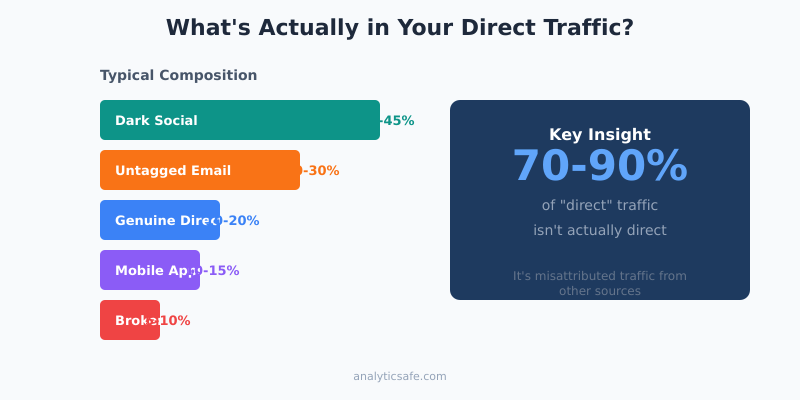
Dark social refers to traffic from private sharing channels — messaging apps, email, and private communities. When someone shares your link in a WhatsApp group, the recipients who click appear as direct traffic. However, they’re actually referrals from social sharing.
Studies suggest that dark social accounts for 80%+ of all social sharing. Most of this ends up mislabeled as direct traffic. If your content is shareable (articles, guides, tools), a significant portion of your “direct” visitors likely came from private recommendations.
2. Email campaigns without tracking
Email is one of the biggest culprits. Many email clients — especially Outlook desktop, Apple Mail, and mobile apps — strip referrer headers entirely. If you’re not using UTM parameters on every email link, all that traffic shows up as direct.
I’ve seen companies with substantial email lists wonder why their newsletters “don’t drive traffic.” The traffic was there — it was just hiding in the direct bucket because links weren’t tagged.
3. Mobile app traffic
When users click links inside mobile apps — Facebook, Instagram, LinkedIn, Twitter — the in-app browser often fails to pass referrer data. This is especially true for iOS apps after Apple’s App Tracking Transparency framework. As a result, traffic from major social platforms can appear as direct.
4. HTTPS/HTTP mismatches
If a secure site (HTTPS) links to a non-secure site (HTTP), browsers don’t send the referrer for security reasons. The MDN Referrer-Policy documentation explains how modern browsers handle referrer headers in different contexts. This is less common now that most sites use HTTPS, but it still affects some older sites and specific configurations.
5. Broken or missing tracking code
Sometimes direct traffic spikes because the tracking code isn’t firing correctly on certain pages. Visitors navigate from a tracked page to an untracked page, and when they return, the session breaks. The new pageview registers as direct because there’s no continuity.
Additionally, JavaScript errors, ad blockers, and consent management tools can prevent tracking from working properly. All these edge cases inflate direct traffic numbers.
How to identify what’s hiding in direct traffic
You can’t eliminate the mystery entirely, but you can reduce it significantly. Here’s how I approach direct traffic audits:
Look at landing pages
Genuine direct traffic — people who actually typed your URL — typically lands on your homepage or well-known pages. If you see direct traffic landing on deep content pages with long, complex URLs, something is off.
For example, if 30% of your direct traffic lands on /blog/2024/03/advanced-attribution-modeling-guide/, those visitors didn’t type that URL. They clicked a link somewhere, and the referrer was lost.
| Landing Page Pattern | Likely Real Source |
|---|---|
| Homepage | Probably genuine direct (brand awareness) |
| Product pages | Could be email, messaging, or bookmarks |
| Deep blog posts | Almost certainly dark social or email |
| Campaign landing pages | Untagged paid or email campaigns |
Check device and browser patterns
Mobile direct traffic is more likely to be misattributed than desktop. If your direct traffic skews heavily mobile, dark social and messaging apps are probably the real sources.
Similarly, certain browsers (Safari with Intelligent Tracking Prevention, Firefox with Enhanced Tracking Protection) are more aggressive about blocking referrers. A spike in direct traffic from these browsers often indicates privacy features at work, not actual direct visits.
Correlate with external data
Compare your direct traffic patterns with your marketing activities:
- Did direct traffic spike after an email campaign? That’s probably untagged email traffic.
- Did it increase after a viral social post? Dark social sharing.
- Did it jump after a PR mention? Journalists often don’t use trackable links.
This correlation isn’t perfect, but it helps you understand the true composition of your direct bucket.
How to reduce misattributed direct traffic
You won’t fix everything — some referrer loss is unavoidable due to browser privacy features and platform restrictions. However, you can significantly improve attribution with these practices:
1. Use UTM parameters consistently
UTM parameters override missing referrer data. If a link includes ?utm_source=newsletter&utm_medium=email, the visit will be attributed correctly even when the email client strips the referrer. You can use Google’s Campaign URL Builder to generate tagged links consistently.
Tag everything you control:
- Email campaigns (every link, not just CTAs)
- Social media posts
- PDF documents and downloadable resources
- QR codes
- Partner links
- Offline marketing materials
For a deeper understanding of attribution approaches, see our guide on attribution models for different business types.
2. Create shareable short links
For content you want people to share privately, provide easy-to-copy short links with built-in tracking. Instead of hoping people share your full URL, give them something like yoursite.com/guide that redirects to the full page with UTM parameters attached.
This captures some dark social traffic that would otherwise be lost.
3. Audit your tracking implementation
Verify that your analytics code fires correctly on every page. Check for:
- Pages where the tracking script is missing
- JavaScript errors that prevent tracking from loading
- Consent management tools that block tracking before acceptance
- Subdomain or cross-domain tracking issues
A proper audit often reveals tracking gaps that inflate direct traffic artificially. Tools like DebugBear’s Lighthouse runner can help spot pages where scripts fail to load.
4. Use privacy-respecting analytics with better defaults
Some privacy-focused analytics tools handle referrer attribution differently. They may use first-party data and different technical approaches that capture more attribution data without relying on third-party cookies or referrer headers.
That said, no tool can completely solve the dark social problem. The fundamental issue — private sharing channels don’t pass referrer data — exists regardless of which analytics platform you use.
What direct traffic actually tells you
Despite its limitations, direct traffic isn’t useless. It provides signals about your brand and content:
Brand strength indicator
Genuine direct traffic — homepage visits from people who know your brand — reflects brand awareness. If this number grows over time (while controlling for dark social inflation), your brand is gaining recognition.
Content shareability signal
High direct traffic to specific articles often indicates private sharing. People are recommending your content through channels you can’t track. That’s actually a positive signal — it means your content is valuable enough to share personally.
Email engagement proxy
If direct traffic correlates with email sends (and you haven’t fully tagged your emails), it’s a rough indicator of email engagement. Not ideal for measurement, but useful for spotting patterns.
Common mistakes with direct traffic analysis
Over the years, I’ve seen teams make the same errors repeatedly when interpreting direct traffic:
Assuming direct means brand traffic
The biggest mistake is treating direct traffic as a pure brand metric. “Our direct traffic is up 30% — brand awareness is growing!” Maybe. Or maybe you stopped tagging email links, or a viral post drove dark social traffic, or your tracking broke on mobile.
Always investigate before drawing conclusions.
Ignoring the composition
A single “direct traffic” number hides multiple distinct audiences. Treating them as one group leads to poor decisions. Segment by landing page, device, and time patterns to understand what you’re actually measuring.
Trying to eliminate it completely
Some teams obsess over reducing direct traffic to zero. That’s neither possible nor desirable. Some portion will always be genuinely untrackable, and chasing perfect attribution often creates more problems than it solves.
Focus on understanding the composition, not eliminating the category.
Not correlating with other data
Direct traffic analysis in isolation is nearly useless. Always correlate with marketing activities, content performance, and external events. The patterns reveal more than the raw numbers.
A practical framework for direct traffic
Here’s the approach I recommend to clients:
| Step | Action | Goal |
|---|---|---|
| 1 | Audit UTM usage across all channels | Reduce preventable misattribution |
| 2 | Segment direct traffic by landing page | Identify likely real sources |
| 3 | Compare mobile vs desktop patterns | Estimate dark social proportion |
| 4 | Correlate with marketing calendar | Spot email and campaign traffic |
| 5 | Track homepage direct separately | Isolate genuine brand traffic |
This won’t give you perfect numbers. However, it will give you a realistic understanding of what direct traffic represents for your specific site.
Bottom line
Direct traffic is analytics’ confession of ignorance. When you see a high percentage, don’t assume people love your brand so much they memorized your URL. Instead, ask what’s hiding in that bucket.
For most sites, direct traffic contains:
- Some genuine brand traffic (homepage visitors, bookmarks)
- A lot of dark social (messaging apps, private shares)
- Untagged email traffic
- Mobile app referrals that lost attribution
- Technical tracking failures
The solution isn’t to obsess over the number — it’s to understand its composition, reduce preventable misattribution through proper UTM tagging, and accept that some traffic will always remain in the dark. That’s not a failure of your analytics setup. It’s simply how the modern web works.
Focus on what you can control: tag your links, audit your tracking, and analyze patterns rather than absolute numbers. The insights you gain will be far more valuable than chasing perfect attribution that doesn’t exist.